Beyond the Firewall: A Harborview Security Story
A scenario-based eLearning module designed to help non-technical small business employees understand what a firewall does, what it cannot do, and why their daily decisions matter for organizational security.

Overview
Audience: Sales agents, property managers, and administrative staff
Tools used: Adobe Captivate, Canva, Affinity Designer, Microsoft Office Suite
Harborview Realty Group is a boutique real estate agency based in the Midwest, specializing in residential home sales and property management. Harborview has 18 employees, including agents, administrative staff, and a small property management team. The company operates from a single office, but agents frequently work remotely from client properties, coffee shops, and home offices. The company relies heavily on email, a cloud-based CRM, and an online document signing platform to conduct daily business.
The Scenario
In early 2025, a Harborview agent received what appeared to be a routine email from a title company requesting updated wiring instructions for a pending closing. The agent, believing the email was legitimate, forwarded sensitive client financial information in response. The email was a spoofing attack; the sender was not the title company at all.
The incident prompted Harborview's office manager, Dana Kellerman, to work with an outside IT consultant to assess the company's security posture. The consultant confirmed that Harborview had a functioning firewall on its office network but identified a significant gap: employees did not understand what the firewall protected, what it did not cover, and how their own actions created risk. The consultant recommended a short security awareness training as a first step.
Dana engaged an instructional designer to develop the training to help all 18 employees build a foundational understanding of the firewall and their personal role in keeping client data secure.
Needs Analysis Process
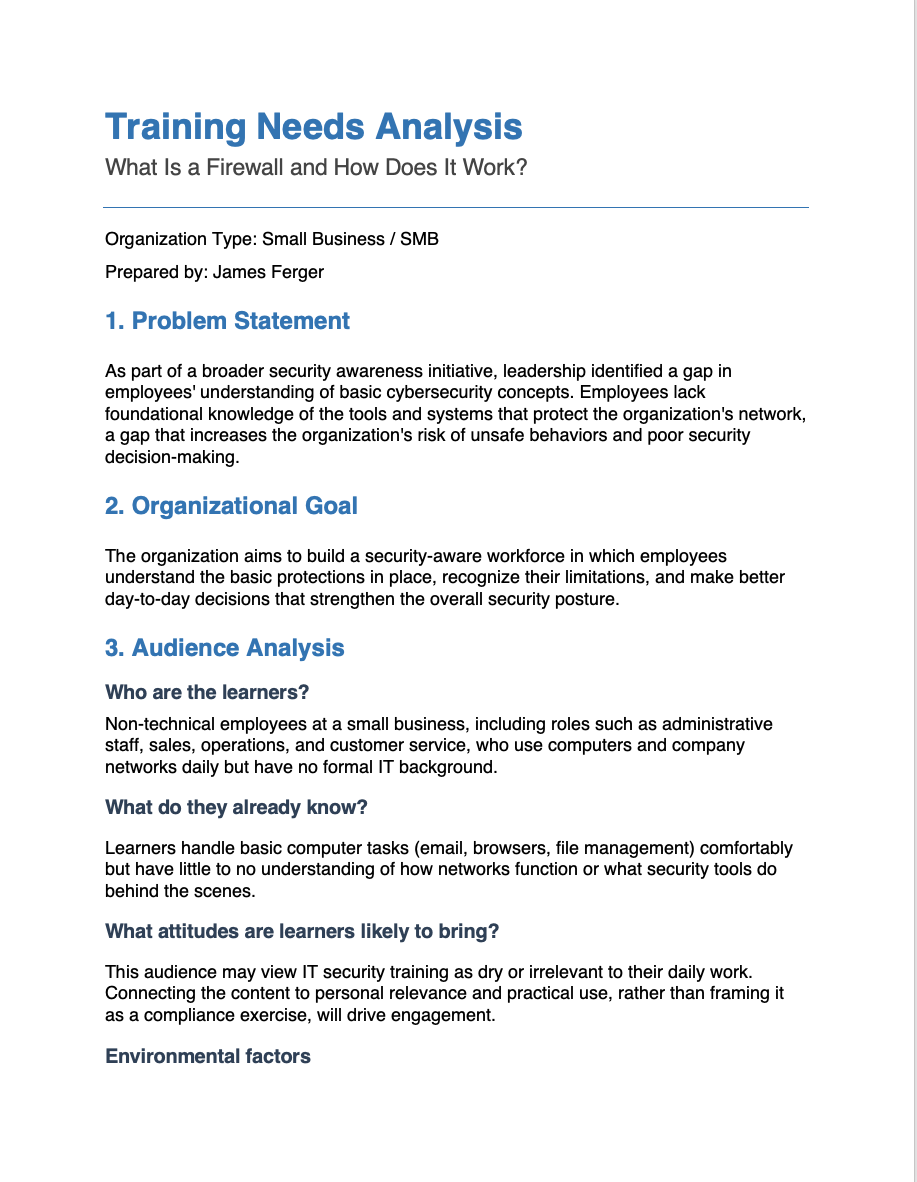
How I Identified the Need
This training did not originate from a routine curriculum review. A Harborview agent forwarded sensitive client financial information in response to a spoofed email, believing the request was legitimate. After the incident, office manager Dana Kellerman engaged an IT consultant to assess the company's security posture. The consultant confirmed that while Harborview had functioning security tools in place, employees lacked the foundational knowledge to understand what those tools did and, critically, what they could not do. The gap was not technological. It was instructional.
How I Gathered Information
I built the analysis on three inputs: a stakeholder interview with Dana Kellerman, the IT consultant's findings, and an audience profile I developed from both sources. The interview with Dana established that the company had never provided formal IT training, that employees ranged from administrative staff to remote field agents, and that the goal was awareness rather than technical proficiency. The consultant's findings identified the most critical gap: a widespread misconception that existing security tools provide complete protection.
What the Analysis Revealed
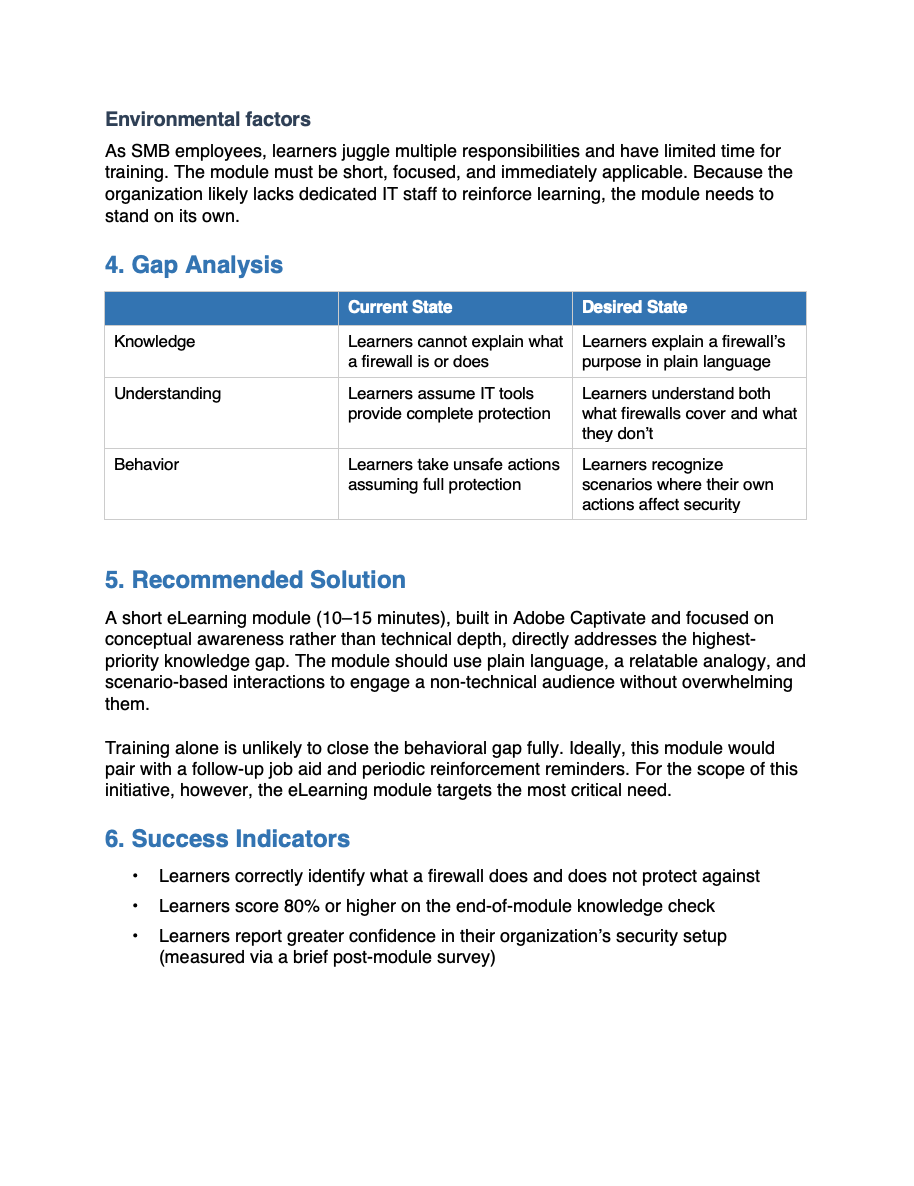
Three findings shaped the scope of the training. First, employees could not explain what a firewall is or how it works. Second, most believed that having security tools in place meant the organization was fully protected, a belief that eliminated any sense of personal accountability. Third, that misconception created direct behavioral risk, as the spoofing incident clearly demonstrated.
Employees were not being careless. They were operating without the information they needed to recognize risk. That distinction shaped the tone of the entire module.
How the Analysis Drove My Design Decisions
I connected each finding directly to a design choice. The knowledge gap led me to open the module with an analogy that builds a mental model before I introduced any technical content. The misconception finding made what a firewall cannot do, a non-negotiable inclusion rather than an afterthought. The behavioral risk pattern shaped the scenario-based knowledge check, where learners respond to situations that mirror the decisions they face in their actual work. The audience profile drove my choice of a 10-15-minute seat time, plain conversational language, and a companion job aid for employees working away from the office.
Every design decision in this module traces back to a specific finding. That traceability is the mark of needs-driven design.
Reflection
This project reinforced a principle central to my practice: training that does not rest on a clear understanding of the audience, the gap, and the context will not change behavior, regardless of how well it is designed. My goal was never to produce a module about firewalls. It was to help eighteen people make better decisions in moments that carry real consequences.
Audience Profile Process
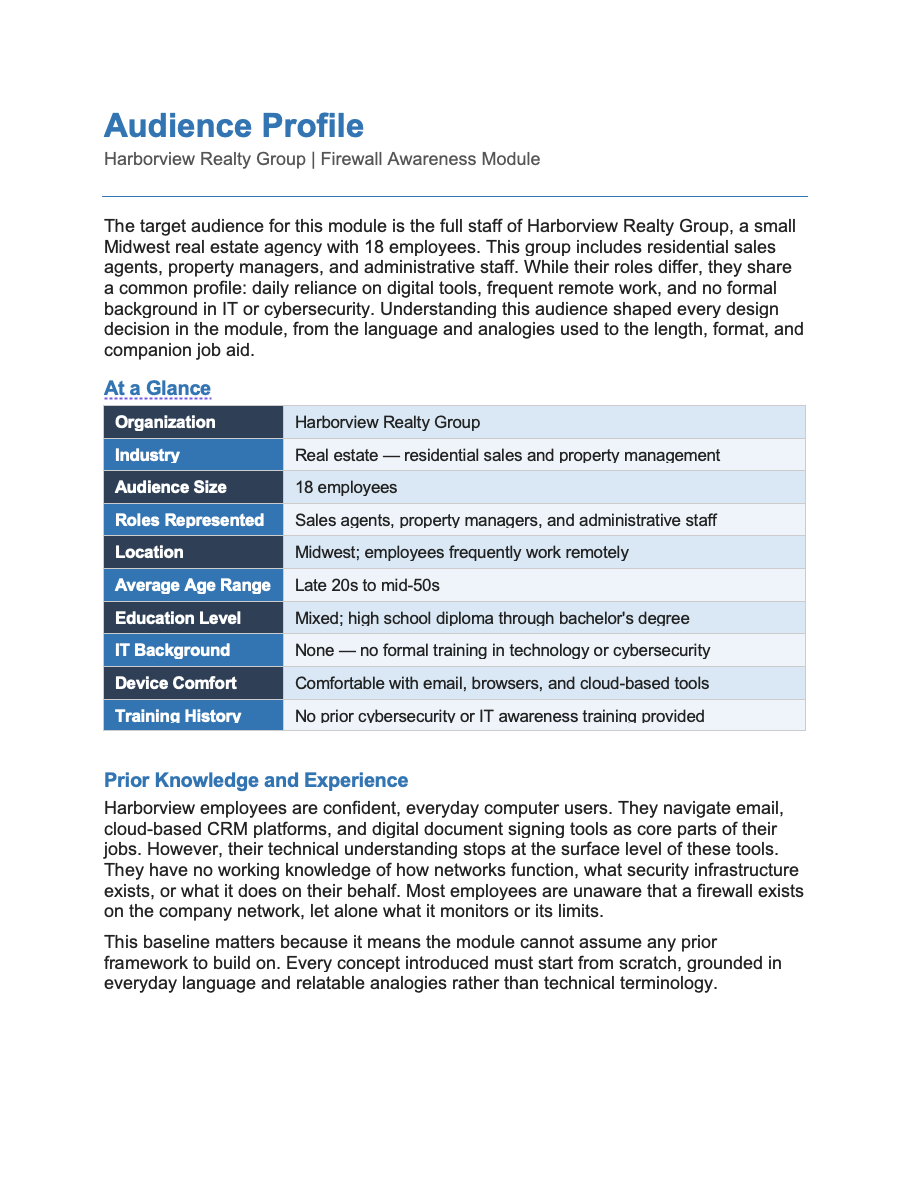
How I Built the Profile
I built the audience profile from two sources. A stakeholder interview with Dana Kellerman identified the learners: 18 employees across sales, property management, and administrative roles, comfortable with everyday digital tools but completely unfamiliar with IT concepts. Dana also confirmed that no formal technology or security training had ever been provided. This was a first-exposure audience, not a refresher audience, and that distinction shaped every decision that followed.
The IT consultant's assessment added a critical layer. It identified not just what employees did not know, but what they incorrectly believed. That difference matters. A knowledge gap means a learner is missing information. A misconception is a belief that actively resists new information unless the design addresses it directly.
There is a difference between a learner who does not know something and a learner who believes the wrong thing. Designing for one when you have the other produces training that does not work.
What the Profile Revealed
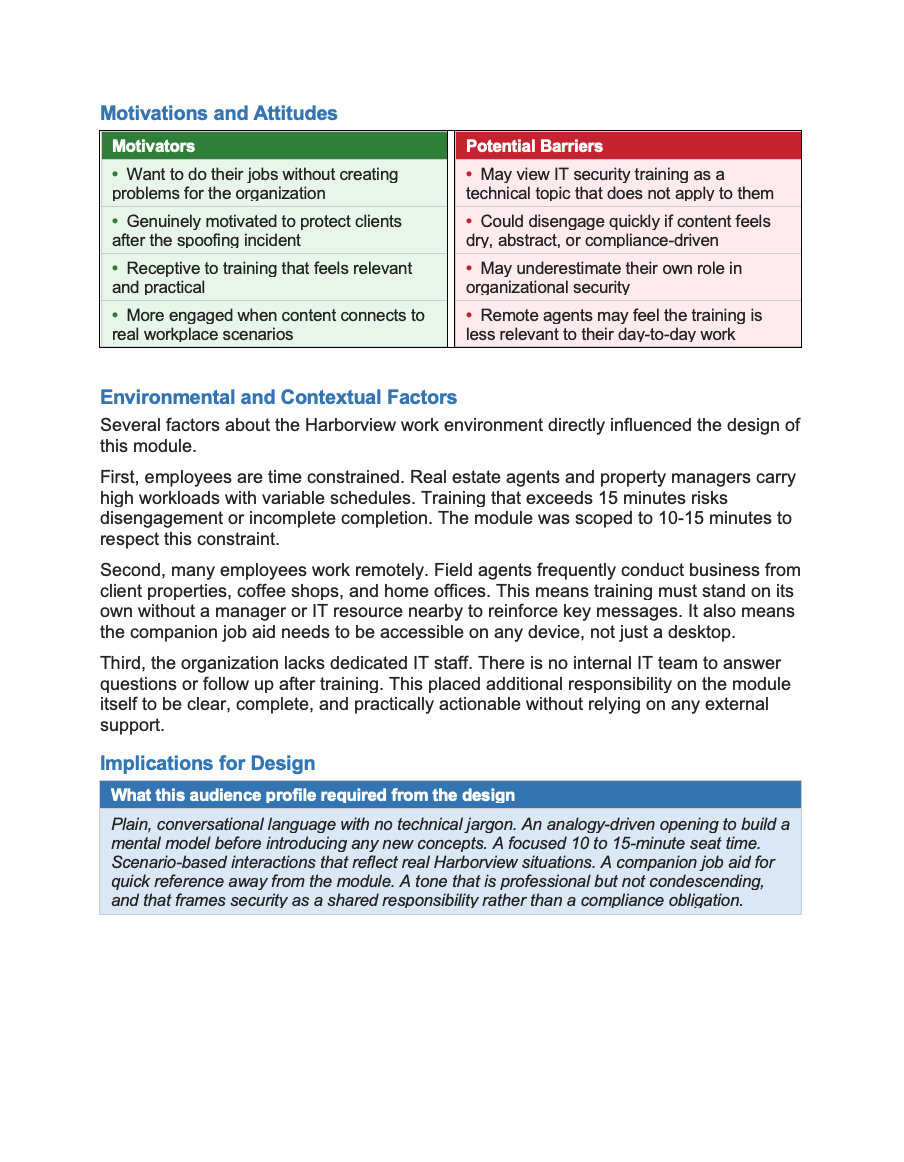
Four insights defined the design constraints for this project. First, the audience had no IT foundation to build on, so every concept had to connect to something learners already understood from everyday life. Second, most employees held a specific misconception — that existing security tools provided complete protection — a belief that required deliberate instructional attention to correct. Third, the audience was time-constrained, with demanding and variable schedules that made scope discipline non-negotiable. Fourth, many employees worked remotely without access to IT support, which meant the training needed to stand on its own and be supported by a portable reference tool.
How the Profile Drove My Design Decisions
Each insight connected directly to a design choice. The lack of an IT foundation led me to open the module with the security guard analogy, giving learners a mental model before I introduced any technical content. The misconception about complete protection made content a non-negotiable inclusion — a learner who finishes the module still believing the firewall handles everything has not been served by the training. The time constraint drove the 10-to-15-minute seat time and kept each slide focused on a single idea. The remote work reality drove the companion job aid, giving field agents a one-page reference they could access from any device without returning to the module.
Audience analysis does not just inform design; it shapes it. The audience analysis constrains the design in ways that make the final product more focused, more relevant, and more likely to change behavior.
Reflection
The Harborview audience profile reinforced a principle central to my practice: the most important thing I can know about a learning experience is who it is for. For this project, that meant designing for people who were not careless or indifferent to security, but who had simply never been given the information they needed to recognize risk. That framing shaped not just what I designed, but how I chose to speak to the learner throughout the entire module.
Design & Storyboarding Process
How I Approach Design
I treat instructional design as an iterative, not a linear, process. Every project starts with structure before content. Before I write a single line of narration or build a single slide, I establish the learning architecture: the objectives, the logical flow of content, and the relationship between what learners need to know and what they need to be able to do. I also build feedback into every stage. Design decisions that feel sound in isolation often reveal gaps when a fresh set of eyes reviews them. Seeking feedback between iterations is how good design becomes better design.
Structure before content. Iteration before polish. Feedback before finalization.
Stage 1: Starting With the Outline
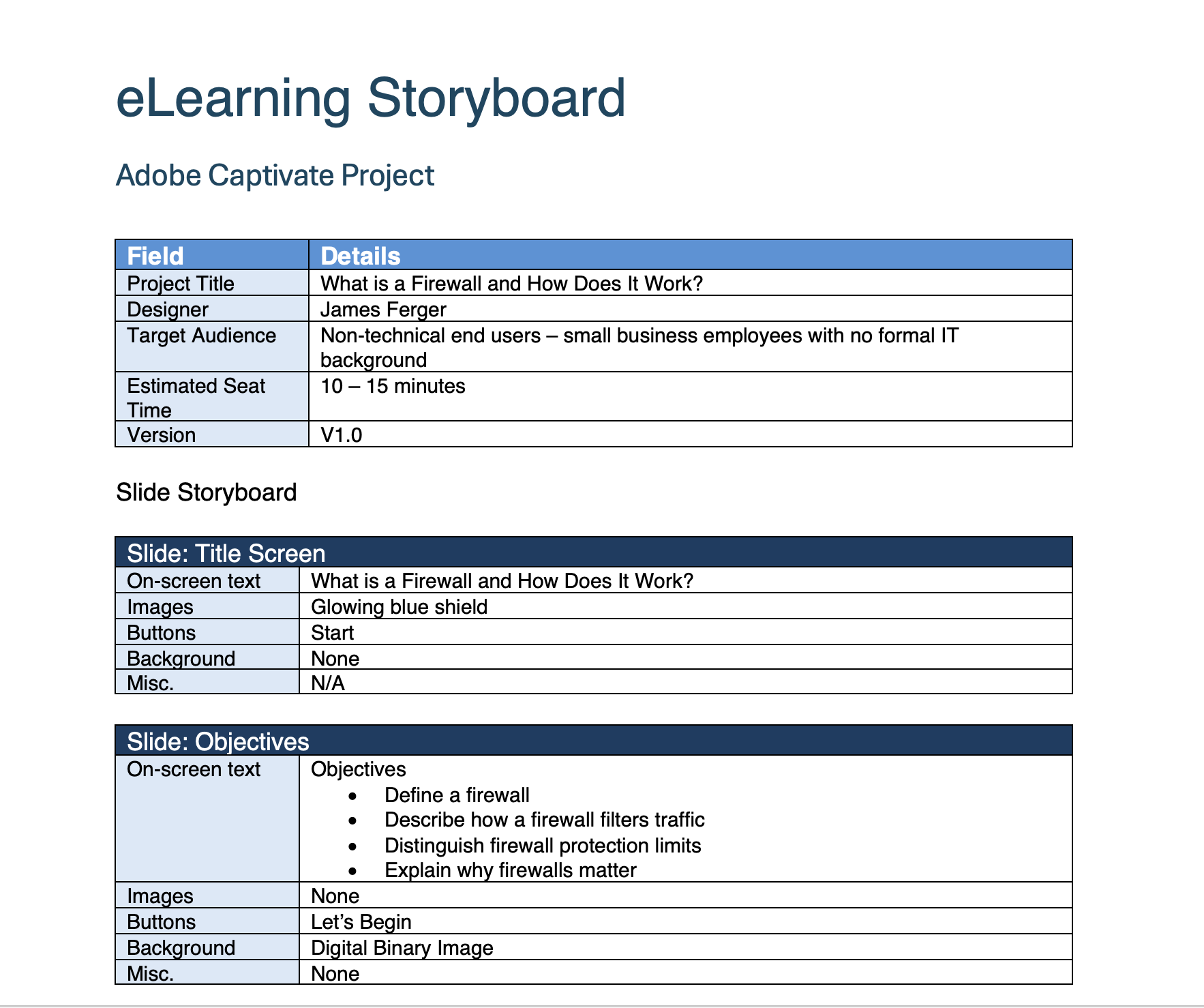
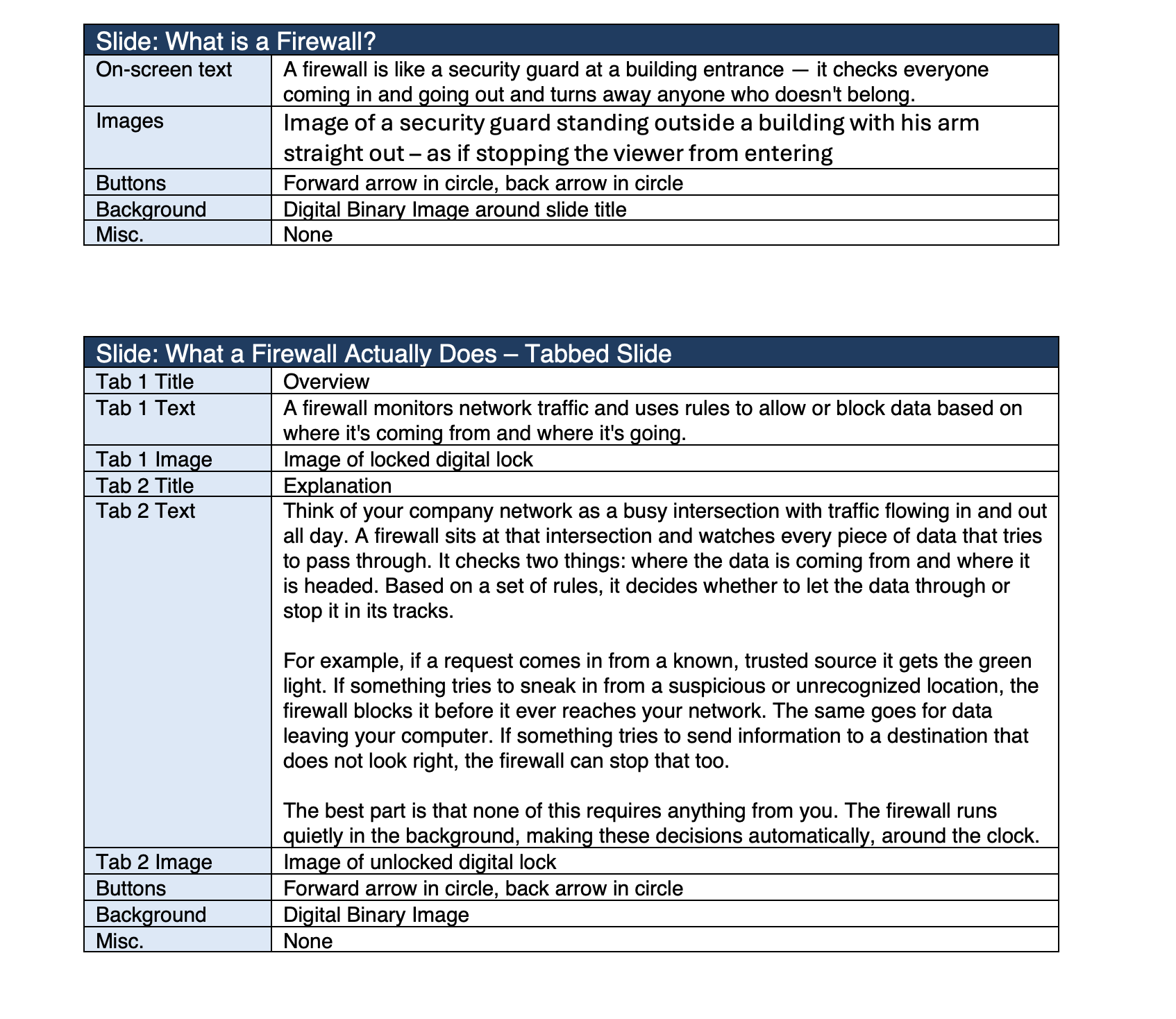
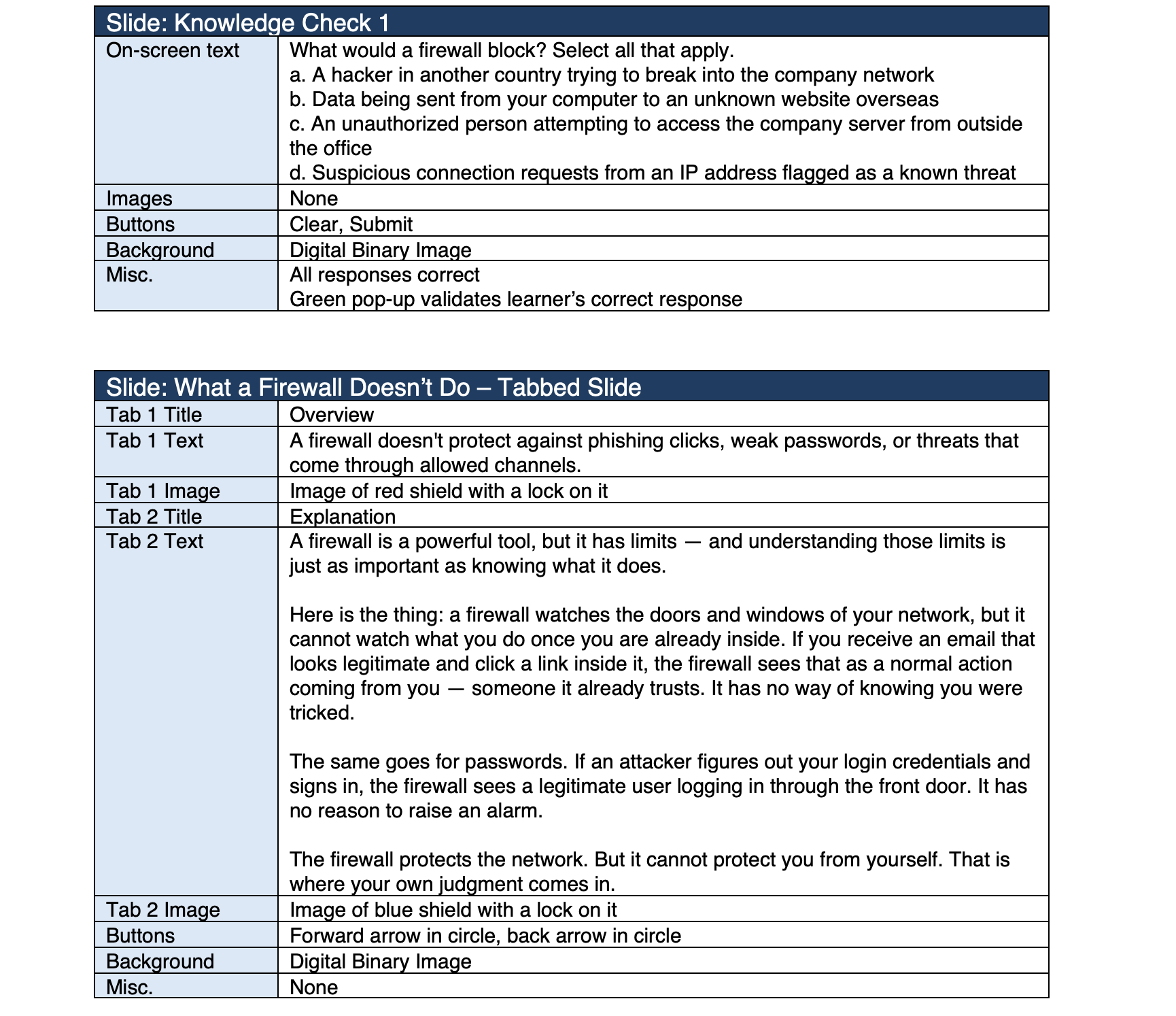
I began the Harborview module with a rough outline before touching the storyboard. The outline helped me confirm that the learning architecture was sound before I invested time in slide-level detail. That early work surfaced two important decisions: the misconception about the need for complete firewall protection required its own dedicated slide rather than a passing mention, and the scenario-based interactions needed to appear before the summary so learners could apply what they learned while the content was still fresh. Neither decision would have been obvious if I had started at the slide level.
Stage 2: Iterative Storyboarding
My first storyboard pass focused on content and flow — what appears on screen, what the narration says, and how each slide connects to the next. I was confirming that the instructional logic worked end to end, not solving the visual design problem yet. The second pass added fidelity: I refined the narration to match the conversational tone the audience required, tightened on-screen text to reduce cognitive load, and developed the interaction design for the knowledge check. The third pass focused on the learner experience as a whole — reading through the complete storyboard as if encountering it for the first time to check pacing, transitions, and whether the closing summary left learners with a clear and actionable message.
The first draft of a storyboard is a hypothesis. Each subsequent pass tests whether that hypothesis holds up against what the learner actually needs.
Stage 3: Feedback and Iteration
Between each major storyboard pass, I sought feedback from Dana Kellerman to confirm that the scenarios reflected real situations Harborview employees face and that the tone felt appropriate for the team. Feedback at the storyboard stage is far more valuable than feedback during development — changes to a storyboard take minutes, while changes to a built module take hours. For this project, stakeholder feedback led to two meaningful additions: the wire fraud scenario, after Dana confirmed email-based payment fraud was the threat she most wanted employees to recognize, and the companion job aid, after she noted that field agents frequently work away from a computer and needed a portable reference tool.
Reflection
The quality of a finished learning experience is determined long before development begins. The outline, the iterative storyboard passes, and the feedback loops are not preparation for the real work — they are the real work. By the time I open an authoring tool, the instructional decisions are already made, tested, and refined. What remains is execution.
Job Aid Design
Why a Job Aid
The job aid was not part of my original design scope. It emerged from the audience analysis. When I learned that Harborview field agents frequently work away from the office, often without access to IT support or a reliable way to revisit the eLearning module, I recognized that the module alone would not be enough. Security decisions do not wait for a convenient moment. An agent who receives a suspicious wire transfer request while sitting in a client's living room needs to know what to do right then, not after returning to the office and logging into a training platform.
That insight drove the decision to create a one-page PDF reference tool designed for exactly that situation. The job aid exists because the audience needed it, the content supported it, and the work's risk profile demanded it.
A job aid is not a summary of the training. It is a performance support tool designed for the moment of need, not the moment of learning.
What Informed the Content Decisions
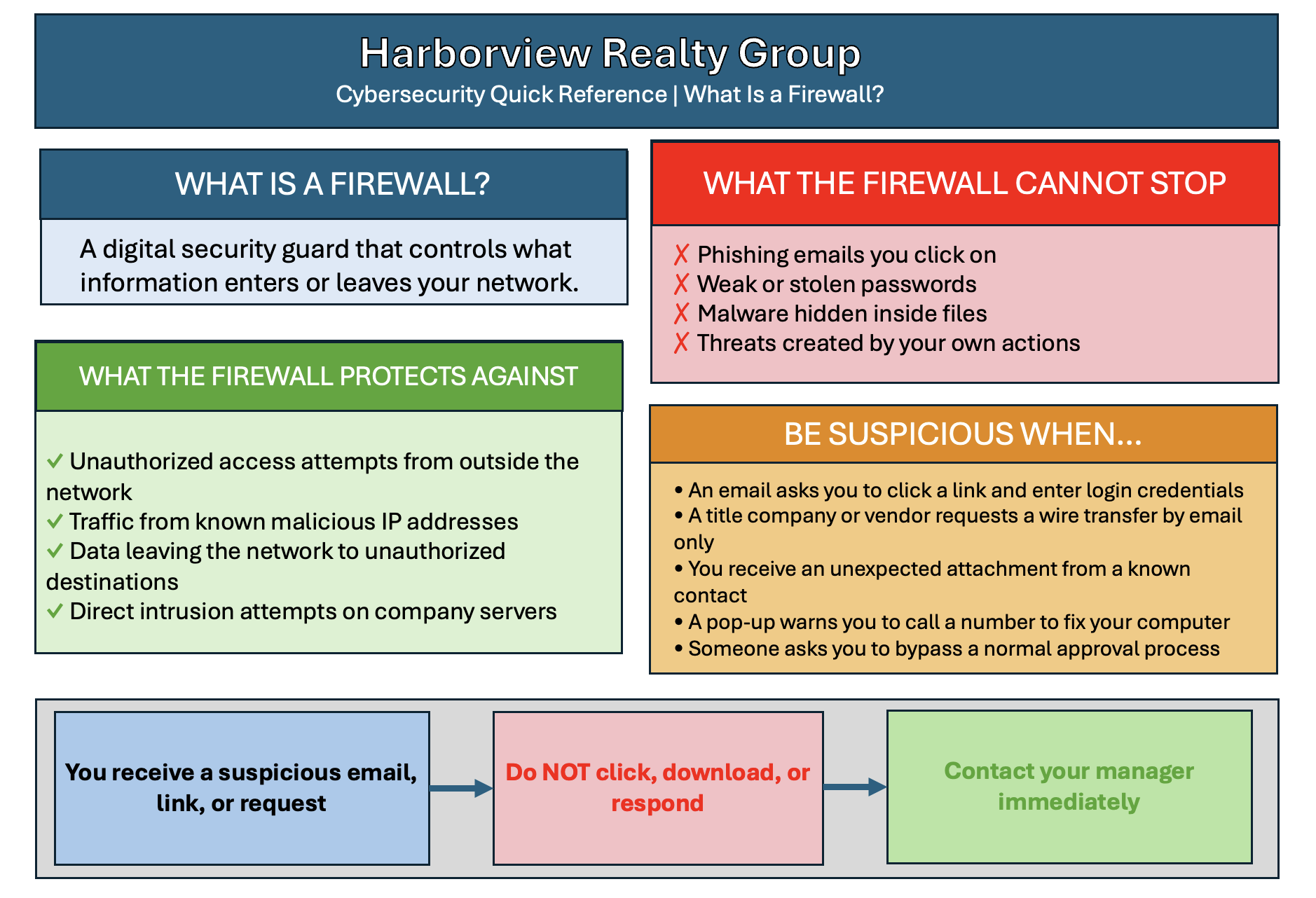
I made three deliberate decisions about what to include and what to leave out. First, I prioritized the content with the highest behavioral stakes. What a firewall cannot stop, the suspicious situation checklist, and the decision flowchart all target the moments where employee judgment matters most. These are situations in which a wrong decision carries real consequences for Harborview and its clients.
Second, I included the wire fraud warning in response to stakeholder feedback. A vendor requesting updated banking information by email mirrors exactly the incident that prompted the training engagement. Including it in the job aid ensures that employees have a concrete reminder of that risk when they need it most.
Third, I excluded content that belonged in the module but not in a field reference. The security guard analogy, the layered firewall diagram, and the conceptual explanation of how firewalls work are valuable for building understanding during training. They are not what an agent needs when they are staring at a suspicious email and deciding whether to act on it.
How I Approached the Design
I designed the job aid around one constraint: it had to be scannable in under 30 seconds. An employee under time pressure will not read a dense document. They will scan for the information they need and act. That constraint drove every layout and formatting decision I made.
I used a two-column layout to separate what a firewall protects against from what it cannot stop, making the distinction visual rather than purely textual. I used color coding consistently throughout, green for protection, red for threats, and orange for caution, so employees can navigate the document by color before they read a word. The decision flowchart reduces the most critical response behavior to three steps, removing any ambiguity about what to do when something feels wrong.
The job aid was designed to work both as a printed desk reference and as a PDF on any mobile device, reflecting the reality that Harborview agents work across multiple environments throughout their day.
Reflection
Including a job aid in this portfolio project was a deliberate choice. Most eLearning portfolios show modules. Adding a performance support tool demonstrates that I think about learning as a system, not a single event. The module builds understanding. The job aid supports performance. Together, they address both what learners need to know and what they need to do when it counts. That pairing is what a complete learning strategy looks like for a small, time-constrained workforce operating in a high-stakes environment.
Reflection - If I had more time and budget
This module accomplishes its core goal: building foundational firewall awareness in a non-technical audience within a tight seat time. Given more time and a larger budget, I would make four targeted improvements that I believe would meaningfully strengthen both the learning experience and the training's long-term impact.
First, I would commission original custom illustrations rather than relying on stock graphics. The security guard analogy that runs through the module is strong instructionally. Still, custom visuals tailored specifically to a real estate office environment would make the content feel immediately personal and relevant to Harborview employees rather than generic.
Second, I would add a branching scenario that places learners inside a realistic Harborview situation, specifically the wire transfer fraud scenario, and asks them to navigate a series of decisions with consequences that play out based on their choices. A single branching interaction of this kind would do more to build behavioral readiness than several additional knowledge check questions.
Third, I would build a short follow-up reinforcement sequence — two or three spaced microlearning touchpoints delivered over the weeks following the initial module. Research on memory retention consistently shows that a single training event produces limited long-term behavior change without reinforcement. A brief weekly scenario delivered by email or through the company intranet would significantly extend the impact of the original training.
Fourth, I would conduct a formal post-training evaluation at the 30- and 60-day marks to assess whether employee behavior had changed in measurable ways. For a small organization like Harborview, that evaluation could be as simple as a brief survey and a review of any reported security incidents. Without that data, the training's real-world impact remains an assumption rather than a demonstrated outcome.
A well-scoped module built within real constraints is always better than a perfect module that never ships. These additions would not change what this module is — they would extend what it does.